Now
What I am currently upto.
September 2026
September 29th, 2026
Happy Autumn 2026. Fall is in full swing here in Central Texas. It is now 94 degrees farenheit, a welcomed coolness compared to 110 degrees in August.
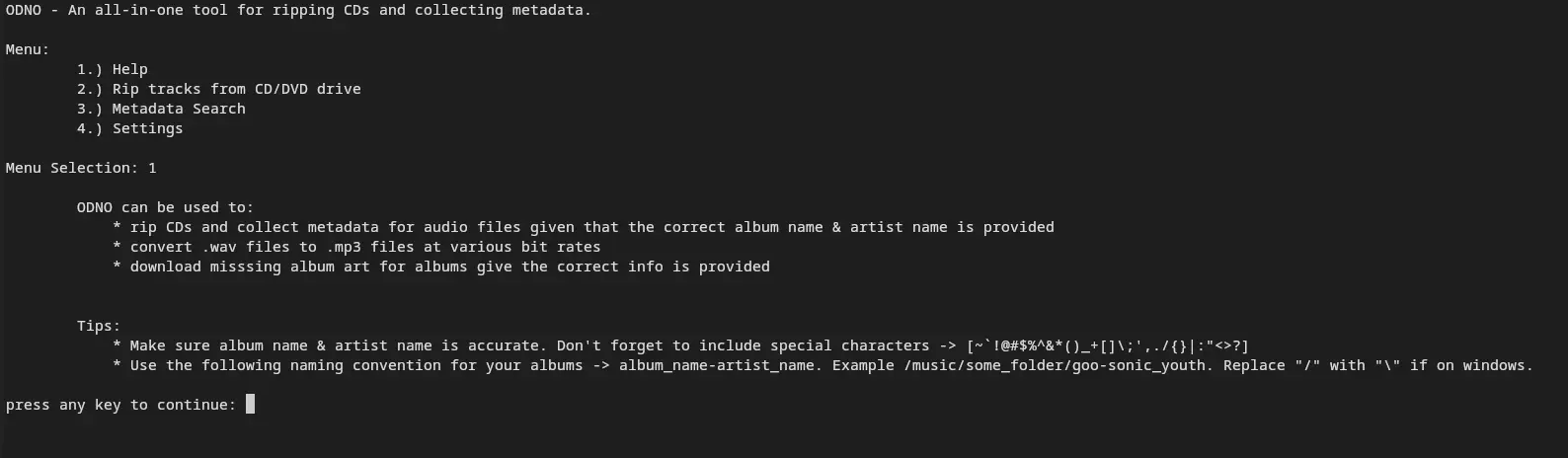
In an attempt to build my own CD Ripper, check out ODNO - The all-in-one CD ripping tool, I have re-discovered the lost art of reading CDs byte by byte using hardware level instructions. By the time I was learning to program everything was a web app and developers were in javascript framework hell. The knowledge needed to interact with a CD at a low level might as well be ancient history. Last July (see previous) I showed off a screenshot from the windows version of ODNO. Since then I have made a lot of progress; however, once again I am reminded that programming is a bottomless pitt of knowledge. Once you learn one thing and think you might be pretty smart, but you soon realize that you know nothing. This abyss so happens to be the APIs necessary to read CD data in Windows. This is a special circle of Hell that I have decided to traverse. More on that later. Along side a Windows version of ODNO, I have been working on a version for UNIX based systems (MAC/LINUX). This version is mostly complete. UNIX based systems use a completely different API for interacting with CD-ROM Drivers. No surprise there. On Linux, the API is ioctl() and on MAC OS is I/O Kit Framework. The UNIX version of ODNO uses libcdio. As far as I know, libcdio is compatible with Linux drivers and MAC OS drivers. I'll find out for sure once I get my hands on a MAC to test with (or I'll figure something out with a virtual machine). As of now, ODNO works on Linux. I can confirm that it works flawlessly on Debian/Ubuntu. Other distros need to be tested. I am still working on writing code that will interface with the proper Windows APIs. Wish me luck.
July 2026
July 28, 2026
Odno, the all-in-one CD ripping tool.
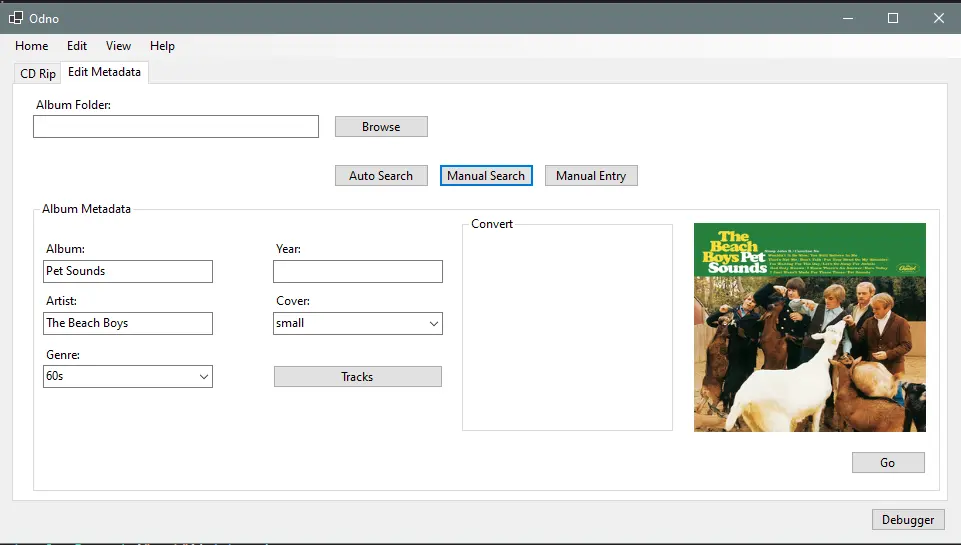
Ripping audio tracks from album CDs that you have purchased is 100% legal. You have the right to make copies of the media you own.
Problem: In most cases when ripping contents from a CD all metadata is lost even if the metadata is present when the CD is played from the disc drive. Perhaps there is a way to rip the CD and extract the metadata,
but in my experience I have not been able to preserve the when ripping its contents. I have used CDParanoia and ffmpeg to copy and extract audio tracks from CDs. In both cases metadata gets lost. This is likely because the contents
are encrypted. Tools like EasyTag exist to add metadata to media files, but its rather tedious. You have to edit the metadata of every track. I am aware that EasyTag can collect data using lastfm's api, but it appears that it is depreciated
as it never seems to work correctly, if at all, in my experience. EasyTag was a decent solution for a while but I felt I could make something to automate this task a little more.
Solution: Build a tool that rips audio tracks from CDs and collects metadata in one go. That is what Odno is designed to do.
I don't doubt that maybe there's something out there that already does this, but I have decided to build something myself to my liking. Why? Because it's fun and I like writing software.
August 2025
August 12, 2025
I began to dip my toes into android app developement. No, I am not ok.
I've just grown tired of web development. I needed something new to do, without having to
learn a whole new language.
Here is the problem I wanted to solve:
I want to listen to music that I own. Smart phones don't technically have a
dedicated mp3 player anymore. There's apple music and google music, but
those are technically streaming apps that let you listen to music you have purchased
from their stores in offline mode. You don't own it. You don't have control over it.
Now, for some people this is fine. This is not fine for me.
I have tried a few mp3 player apps but they either suck, are full of ads or I can't
justify the cost.
My Solution:
I will build the mp3 player that meets my needs. Ad free, simple, and most importantly,
empower the user (me) to have control and access their/my music.
I have so many CDs and mp3 files that I don't have access to. Maybe there is a simple
way to import those files to apple music or google music, but at this point I don't care.
I don't like the way those apps were developed. Offline listening feels like an after
thought, so I figured, why not just make my own app? I needed something to do anyway.
More on this coming soon. Hopefully.
July 2025
July 11th, 2025
I was playing around with the Java Math library and came across this interesting way to check if an integer is prime:private static boolean checkPrime(int n){
if(n <= 1){
return false;
}
//check if divisible by 2 or 3 b/c of integer rule (6k + i when < 5)
if(n % 3 == 0 || n % 2 == 0){
return false;
}
for (int i = 5; i <= Math.sqrt(n); i += 6){
if (n % i == 0 ||
n % (i + 2) == 0 {
return false;
}
}
return true;
}
Optimal Prime Checking with "Trial Division"
This is an optimal approach using "Trial Division".
Divisors of a number are guaranteed to appear in pairs at a minimum. For example:
- 28 ÷ 4 = 7, therefore 28 ÷ 7 = 4.
- Thus, the divisors of 28 include [4, 7].
The key insight is that for every divisor d of n, there is a corresponding divisor n/d.
- If d ≤ √n, then n/d ≥ √n.
- Therefore, we only need to check values up to √n, reducing the number of iterations.
Additionally, any integer can be expressed as 6k + i, where 0 ≤ i ≤ 5.
- The forms 6k, 6k + 2, 6k + 3, and 6k + 4 are all divisible by 2 or 3.
- Following this logic, if n is divisible by 2 or 3, it is not prime — unless n itself is 2 or 3.
Neat.
September 14, 2024
I am currently arguing with jdbc client. I have an array of strings that I want to insert into my db as one big string seperated by commas.
idea: ['str1','str2'] -> "str1,str2"
To achieve this, I wrote:
String strs = String.join(",", list);Should be simple enough. Java returns the list as a string as expected, but jdbc insists on entering it into my db as a String[].
UPDATE: Lucky for me using a list wasn't necessary, so I was able to change the data type in my DTO class from
List list;to
String[] arr;and it plays nice with jdbc array data type. Who would've guessed?
August 2024
August 31, 2024
I have a few different websites where I upload my photographs. Some of the images I upload are only 1mb, but I know these files can be smaller with comparible quality and resolution. I decided to start exploring compression algorithms, specifically for image compression. To start, I looked at bicubic interpolation, the slowest algorithm, but one that can yield a pretty high quality image. To compress the images, I wrote a python CLI which takes the path of an image or the path of a directory of images, opens the image file using cv2, reduces the file by a factor of x dependent on the resolution and then scales the image back up using bicubic interpolation. The CLI also gives the user an option to do a simple reduction, which uses a function available in the PIL(Python Image Library). Why Python? I chose to write it in python so that I could write it fast. I don't have a lot of experience in C or C++ and I didn't want to write it in Java. I am not a professional Python Programmer, so I don't always care about writing things in a pythonic way. I wrote this CLI and the algorithm in python because I just wanted to focus on the bicubic interpolation algorithm itself. You can check out the repo on my github. I plan to follow this up with a proper blog post eventually.
